Posts

SCCM 2007 Client error code 1603
Image
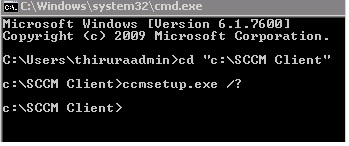
“sccm installation failed with error code 1603” Getting error for SCCM 2007 Client installation Below are the SCCM Client installation options for CCMSETUP.exe “sccm installation failed with error code 1603” 1. Navigate to the following folder and run the following commands: C:\Windows\System32\Wbem for /f %s in ('dir /b *.mof *.mfl') do mofcomp %s for /f %s in ('dir /b /s *.dll') do regsvr32 /s %s First command will recompile all the mof fils under the WBEM folder Second command will register all the .dlls under the WBEM folder 2. Verified the WMI permission under DCOMCNFG Default WMI DCOM Settings: Modifying the default WMI DCOM Settings can also cause a wide range of problems. Once again, you can use DCOMCNFG to view these settings. Windows XP a. Start -> Run -> Open: DCOMCNFG b. Expand Component Services node c. Expand Computers node d. Expand My Computer node e. Expand DCOM Config nod...
Windows Firewall Settings for SCCM Clients 2007

Client Push Installation In order to successfully use client push to install the Configuration Manager 2007 client, you must add the following as exceptions to the Windows Firewall: • File and Printer Sharing  • Windows Management Instrumentation (WMI)  Client Installation using Group Policy In order to successfully use Group Policy to install the Configuration Manager 2007 client, you must add File and Printer Sharing as an exception to the Windows Firewall. Client Requests In order for client computers to communicate with Configuration Manager 2007 site systems, you must add the following as exceptions to the Windows Firewall: TCP Port 80 (for HTTP communication) TCP Port 443 (for HTTPS communication) Network Access Protection In order for client computers to successfully communicate with the system health validator point, you need to allow the following ports: •UDP 67 and UDP 68 for DHCP •TCP 80/443 for IPsec Remote Control   In order to ...

System Center Configuration Manager Services

Image
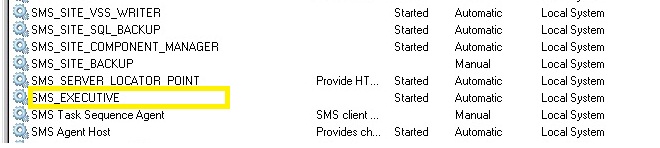
System Center Configuration Manager Services  Active services running in SCCM primary server SMS_Executive Service  SMS_Site_Component_Manager SMS_Site_SQL_Backup SCCM Active Server Services Secondary Site

Error when trying to create a new collection "Form that is already visible cannot be displayed as a modal dialog box"

Image
Error when trying to create a new collection Getting below error when creating a New collection. Form that is already visible cannot be displayed as a modal dialog box Error Code Below ConfigMgr Error Object: instance of SMS_ExtendedStatus { CauseInfo = "11"; Description = "Unable to update parent collection due to SQL error."; ErrorCode = 3242722566; File = "e:\\nts_sms_fre\\sms\\siteserver\\sdk_provider\\smsprov\\sspcollection.cpp"; Line = 766; ObjectInfo = "Adobe ; Operation = "PutInstance"; ParameterInfo = ""; ProviderName = "ExtnProv"; SQLMessage = "[HYT00][0][Microsoft][ODBC SQL Server Driver]Timeout expired"; SQLSeverity = 0; SQLStatus = 0; StatusCode = 2147749889; Suggested Steps To check 1.  Restart the console, log out and log back in, 2. Check in the  Smsprov.log file  for SQL related Errors  3. Reboot the SCCM Server 4. Try I ncreasing the tempdb size ...

SCCM 2007 Updates Deployment issues

Image
  Install not allowed as another job is still in progress Security updates deployments to Servers Having an issue with a ConfigMgr client not installing updates No errors just showing  “ Install not allow as another job is still in progress”      or  “Security updates preparing for installation” Even after the reboot, machine policy reset, no resolution  There are no errors in the log files  UpdateDeployment.log  except showing the messages saying   "Install not allow as another job is still in progress" Steps to be followed  Kindly use SCCM Client Center to Repair WMI its more effective  SCCM Client Center to "Delete root\ccm" (button under Repair WMI) to delete the CCM Namespace from WMI. These steps worked and the SCCM service (SMS Agent Host) came back online, software updates scan took place and assignments started to apply. Updates began to download and apply as normal....

SCCM Software updates error WUAHandler.log errors

If you find errors in the WUAHandler.log as below "OnSearchComplete - Failed to end Search job. Error = 0x80072efd Scan failed with error = 0x80072efd" Error 0x80072efd means: 'The attempt to connect to the server failed. Can you check the following logs for more information "%Windir%\WindowsUpdate.log and ScanAgent.log Server not being able to talk to the WSUS server because port 8530 might be blocked lack of  communication  between the client and the SCCM sup if you are working with custom WSUS ports. Do not forget to open the used ports in the Windows Firewall Create a rule for inbound TCP (WSUS ports). In my case it was for 8530 and 8531. 

Steps to recreate WMI and Repair Corrupt WMI Services

WMI Error messages in execmgr.log file on SCCM clients   ·          Failed to open to WMI namespace '\.rootccmPolicyMachine' (8007045b) ·          Failed to ConnectSettings for ICcmPolicyAgent in CSoftDistPolicyNamespace::ConnectToNamespace ·          Failed to ConnectToNamespace in CSoftDistPolicyNamespace::GetMachinePolicy ·          Failed to connect to machine policy name space. 0x8007045b ·          Failed to connect to user policy name space ·          CSoftwareDistPolicyMgr::GetSWDistSiteSettings failed to connect to machine namespace ·          Failed to instantiate UI Server {C2F23AE4-82D8-456F-A4AF-A2655D8CA726} with error 8000401a ·        ...